
Mar 16, 2026
Face Verification Time Tracking Without Biometrics
How Timekeep's kiosk mode turns any tablet or phone into a clock-in station with photo verification. No biometric machines, no buddy punching.
If you run a small business with staff who clock in and out, you've probably dealt with at least one of these problems:
- Someone clocks in for a coworker who's running late
- The biometric machine breaks and nobody notices until payroll
- You're cross-checking the biometric log against the schedule by hand
- The machine was expensive, and now you need a second one for a new location
Biometric machines were supposed to solve attendance tracking. For a lot of small businesses, they just created different problems.
The buddy punching problem
Buddy punching is when one employee clocks in for another. Fingerprint scanners reduced this, but they didn't eliminate it. Supervisors can still override. Machines can malfunction. And if you're not physically there to watch, you're trusting that the system is being used honestly.
The real issue isn't the technology. It's accountability. You need a system where each clock-in is verifiable, and where you can check it later if something looks off.
How Timekeep's kiosk mode works
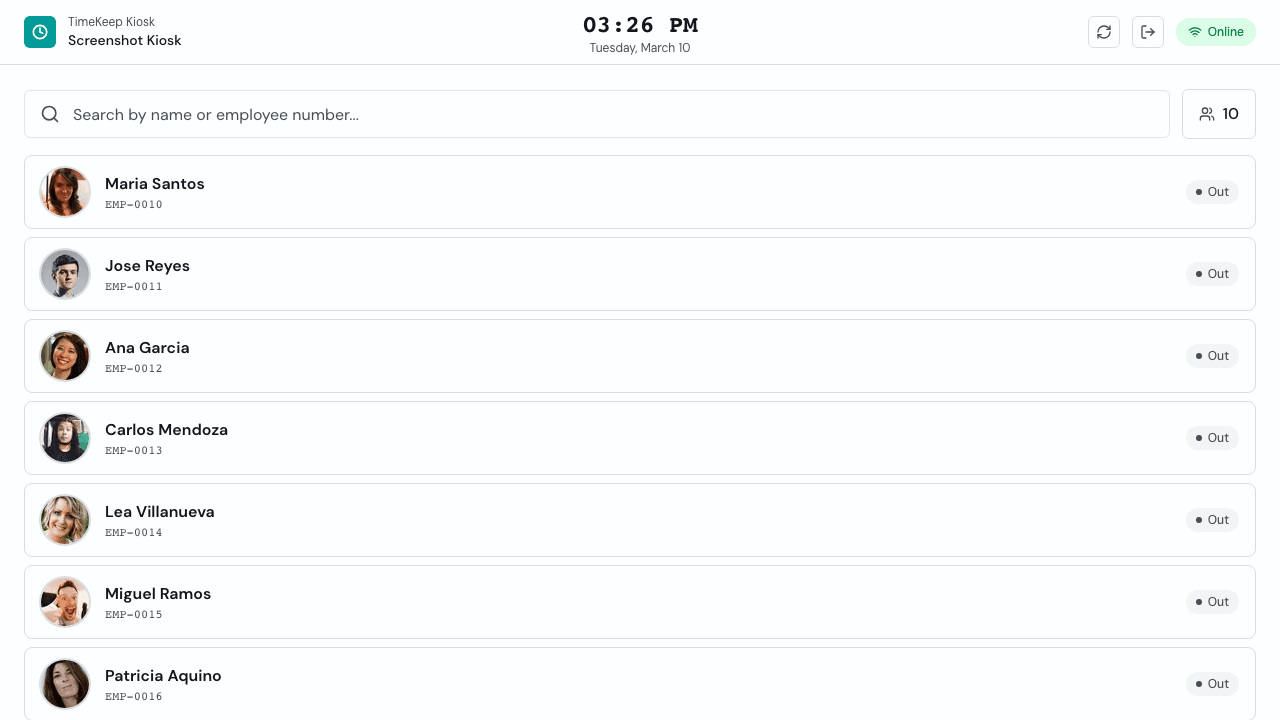
Timekeep has a kiosk mode that turns any tablet or phone into a shared clock-in station. Here's how it works:
- Set up any device with a camera as a kiosk (a tablet mounted near the entrance works well)
- When an employee arrives, they tap their name on the screen
- The device takes a photo of them
- The photo is stored with their clock-in record
- The clock-in appears on your real-time attendance dashboard
That's it. No fingerprint scanner, no biometric hardware, no special equipment. Just a tablet or phone you already have.
Why photos work better than fingerprints for small businesses
Fingerprint scanners have a few problems that don't get talked about enough:
- Cost. A decent biometric machine runs ₱5,000 to ₱15,000. If you have two locations, that's two machines.
- Maintenance. They break. The sensor gets dirty. The software needs updates. When it stops working, nobody clocks in properly until it's fixed.
- No visual proof. A fingerprint log tells you someone's finger touched the scanner. A photo tells you who was actually there.
- Setup. You need to enroll every employee's fingerprint, which takes time and sometimes fails for employees with worn fingerprints.
Photo verification is simpler. You already have a tablet. Your staff already know how to use it. And when you review attendance, you can see who actually showed up.
What you can verify
Every clock-in in Timekeep comes with a timestamp and a photo. When you open the attendance dashboard, you can see:
- Who clocked in and when
- The photo taken at clock-in
- Whether they were late (based on their scheduled shift)
- Whether they're currently on break or clocked out
If something looks off, you have the photo right there. You don't have to ask the supervisor what happened. You don't have to check a separate system.
No hardware to buy or maintain
This is the biggest practical advantage for small businesses. A biometric machine is a dedicated piece of hardware that does one thing. When it breaks, you're stuck until it's repaired or replaced.
Timekeep's kiosk mode runs on any device with a browser and a camera. An old tablet mounted on the wall works. An iPad your shop already has works. Even a phone works in a pinch.
If the device breaks, you grab another one and log in. No data lost, no downtime.
Connected to payroll
Because kiosk clock-ins feed directly into Timekeep's attendance system, they're automatically reflected in payroll. Overtime, late deductions, undertime, and rest day premiums are all computed based on the actual clock-in and clock-out times.
There's no export step, no manual transfer, no cross-checking between two systems. The attendance data and the payroll data are the same data.
Setting it up
Setting up kiosk mode in Timekeep takes a few minutes:
- Go to the Kiosk section in your Timekeep dashboard
- Open the kiosk link on the device you want to use
- Mount the device where your staff can reach it
Your team clock in from day one. No fingerprint enrollment, no training sessions.
Is it right for your business?
Kiosk mode with photo verification works well for businesses where:
- Staff clock in at a fixed location (a shop, cafe, restaurant, office)
- You want accountability without expensive hardware
- You have multiple locations and don't want to buy a machine for each one
- You're tired of maintaining a biometric scanner
If your current system is working and you're happy with it, that's fine. But if you're spending money on biometric hardware and still cross-checking attendance by hand, Timekeep's kiosk mode does the same job with less cost and less hassle.
Try it free for 30 days at timekeep.ph. No credit card required.