
Mar 14, 2026
Choosing Payroll Software for Philippine Small Business
A practical guide for Philippine business owners choosing payroll software. What actually matters when you have 5 to 50 employees and no HR department.
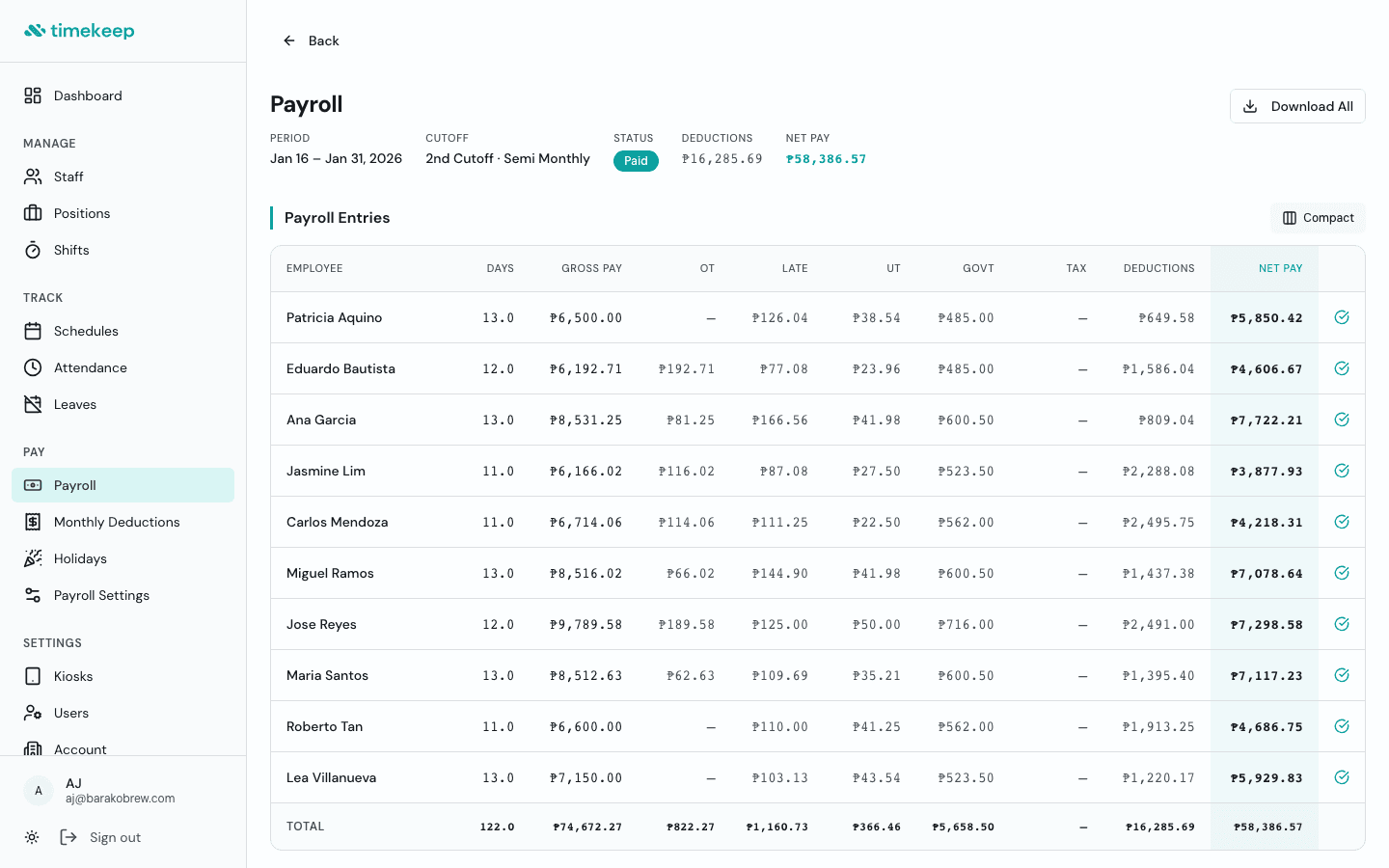
If you run a small business in the Philippines, you know the payroll routine. Every cutoff, you're computing deductions, cross-checking attendance, and Googling the latest SSS contribution table. It works until it doesn't.
At some point, the spreadsheet gets unwieldy, someone's PhilHealth is wrong, or you spend an entire evening fixing one pay period. That's usually when business owners start looking for payroll software.
The problem is that most payroll software in the Philippines isn't built for you. It's built for companies with HR departments. Here's what to look for instead.
Government compliance should be built in, not bolted on
This is the non-negotiable. Whatever you use needs to compute SSS, PhilHealth, Pag-IBIG, and BIR withholding tax using current tables. Not last year's tables. Not "configurable" tables you have to update yourself.
Ask these questions:
- Does it compute SSS employee and employer share automatically?
- Does it apply the correct PhilHealth premium rate?
- Does it handle Pag-IBIG brackets?
- Does it compute BIR withholding tax per the TRAIN Law?
- Does it keep these tables updated when the government changes them?
If the answer to any of these is "you configure it yourself," that's not saving you time. That's moving the spreadsheet into a different window.
Timekeep computes all four agencies automatically using current contribution and tax tables. When the government updates a bracket, Timekeep updates it for you.
Pricing should be on the website
This sounds obvious, but look at the payroll software market in the Philippines. Several major players hide their pricing behind "Book a Meeting" buttons or "Contact Sales" forms.
If you have to schedule a sales call to find out how much something costs, it probably isn't priced for a cafe with 10 employees. It's priced for a BPO with 500.
Look for transparent pricing. You should know exactly what you'll pay before you sign up.
Timekeep costs ₱999/month for up to 10 employees, with each additional employee at ₱49/month. There's a 30-day free trial with no credit card required. That's on the website, not behind a form.
Setup should take minutes, not weeks
Some payroll systems call themselves "the most configurable." That sounds good until you realize it means weeks of setup before you can run your first payroll.
You don't need configurability. You need it to work. Add your staff, set their rates and schedules, and run payroll. If it takes more than a day to get started, it's built for someone with more time than you have.
Timekeep is designed so you can set up your team and run your first payroll in the same afternoon.
Attendance and payroll should be connected
If attendance lives in one system and payroll lives in another, you're still cross-checking manually. The whole point of switching from a spreadsheet is to stop doing that.
Look for software where attendance feeds directly into payroll. Clock-ins, overtime, late arrivals, rest days, and holidays should all flow into the payroll computation automatically. You review the numbers, approve, and you're done.
Face verification solves the buddy punching problem
Biometric machines are expensive. They break. And they still don't prevent the supervisor from clocking in for someone who's running late.
A better approach: turn any tablet or phone into a clock-in station with photo verification. The employee taps their name and takes a photo. No hardware to buy or maintain, and you have a photo record of every clock-in.
Timekeep's kiosk mode works exactly this way. Any device with a camera becomes a time clock.
Your staff should be able to check their own payslips
If your team's only way to see their payslip is through a screenshot in a group chat, you're fielding the same questions every cutoff. "Where's my payslip?" "How much was my SSS?" "Why is my net pay different?"
An employee portal changes this. Staff log in with a simple PIN and see their own schedules, payslips, leave balances, and deduction breakdowns. Fewer repeat questions for you, more transparency for your team.
Holiday pay shouldn't require a calculator
Philippine holiday pay is complicated. Regular holidays pay 200% of the daily rate. Special non-working days pay 130%. Rest days have their own premium. And when a holiday falls on a rest day, the rates stack.
Your payroll software should handle all of these combinations automatically, including the Philippine holiday calendar. If you're manually computing holiday pay multipliers, you're doing work the software should be doing for you.
What to skip
A few things that sound important but don't matter for small businesses:
- HR analytics dashboards. You have 15 employees. You know who's performing.
- AI assistants. You need payroll computed correctly, not a chatbot.
- 15+ product modules. You need payroll, attendance, and scheduling. That's it.
- Salary benchmarking. That's for companies hiring at scale, not for your next barista.
The bottom line
The best payroll software for a Philippine small business is one that does the basics correctly: government-compliant deductions, connected attendance and payroll, transparent pricing, and a setup process that respects your time.
You've been making it work with spreadsheets and manual computation. That's resourceful. But if you want something faster, look for software built for business owners, not for HR departments.
Timekeep was built by a cafe owner who had the same payroll problems you do. It handles SSS, PhilHealth, Pag-IBIG, and BIR automatically. It connects attendance to payroll. And it costs less than the price of one SSS penalty.
Try it free for 30 days at timekeep.ph. No credit card required.